Linksys WRT54GL Router: Firmwares, Improving Performance, Overcloking, Slow speed download L2TP/PPTP UFI NGN

Low Download Speeds over L2TP/PPTP connections

Unfortunately this router is useless for UFI L2TP/PPTP connections which are in Israel.

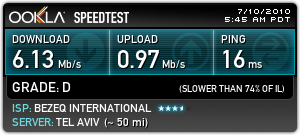
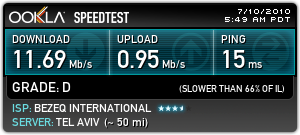
Maximum speed was obtained around >750kBytes/s.

SO, STAY AWAY FROM WRT54GL ROUTER for >6Mbit over L2TP/PPTP. You will download maximum at 750kByte/s

Router:

Direct:

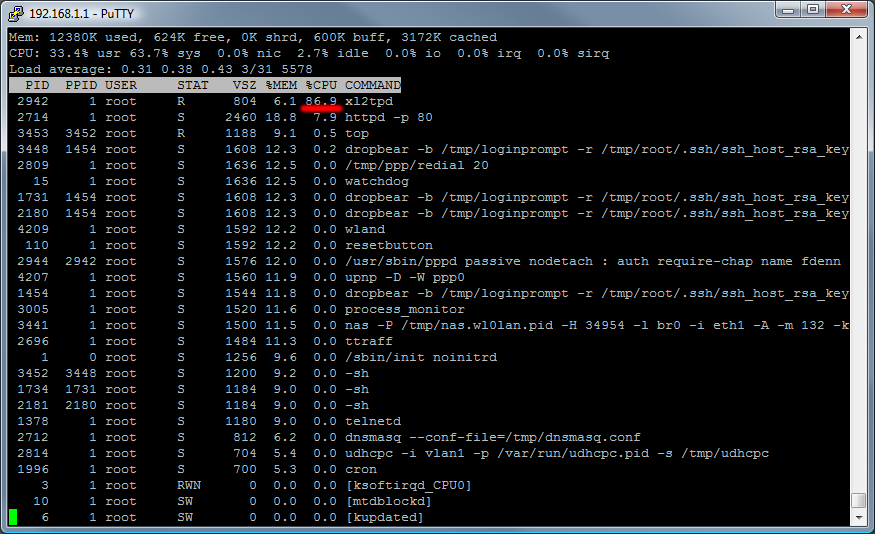
top command:

Firmwares

Tomato firmware

http://www.polarcloud.com/tomato

http://en.wikibooks.org/wiki/Tomato_(firmware)

DD-WRT firmware

http://www.dd-wrt.com/site/support/router-database

Note: Upgraded from Tomato 1.28 by resetting NVRAM and flashing dd-wrt mini version followed by voip version.

Patch for Israel HOT L2TP in DD-WRT

http://www.dd-wrt.com/phpBB2/viewtopic.php?p=460955

change

refuse pap = no

in /tmp/xl2tpd/xl2tpd.conf

However, changes are lost after reboot.

You can use this script:

http://hotfortech.wikispaces.com/DD-WRT+home+setup

Overclocking (SSH, Telnet, Terminal, Command line)

Stick to 225, 240, 250 MHz. There reports of bricks on other clocks.

nvram set clkfreq=250
nvram commit
reboot

Checking speed of CPU

grep MIPS /proc/cpuinfo

CentOS5 Repositories Latest Versions (samba, apache, mysql, php)

Sernet Samba 3.5 repository

yum repo file: sernet-samba.repo

Jason’s Utter Ramblings Repo (httpd, php, mysql)

Import the GPG key:

rpm –import http://www.jasonlitka.com/media/RPM-GPG-KEY-jlitka

Create /etc/yum.repos.d/utterramblings.repo:

[utterramblings]
name=Jason’s Utter Ramblings Repo
baseurl=http://www.jasonlitka.com/media/EL$releasever/$basearch/
enabled=1
gpgcheck=1
gpgkey=http://www.jasonlitka.com/media/RPM-GPG-KEY-jlitka

Webcam Based Motion Sensor Software for Computer LCD Display (Monitor) Power State Control On/Off (Version 1.0.1)

As a part of my project towards PC based Home Information Display (i.e., Smart Photo Frame). I developed small program for controlling the LCD Display power state based on motion detection by simple webcam.


Program based on AForge.NET Framework’s sample application:

zip Motion Sensor (executable, Windows XP, Vista, 7) (250.87 KB)
zip Motion Sensor (Source Code C#, GPL) (80.53 KB)

Lost.S06E15.720p.HDTV.x264-CTU.srt Russian Subtitles (Русские субтитры)

Russian subtites translated by Notabenoid pasted on English x264 720p synced subtitles.

(Русские сабы для Lost 6×15 720p) : zip Lost.S06E15.720p.HDTV.x264-CTU.rus.srt (9.87 KB)

Conductive polymers

I present here my literature seminar (as a requirement for PhD degree) on topic “Intrinsically Conductive Polymers”.

 PowerPoint version: pptx Conductive_Polymers_Final_Publish.pptx (6.35 MB)

PDF version: pdf Conductive_Polymers_Final_Publish.pdf (3.59 MB)

Continue Reading »

"Must Have" Programs on WM6 PocketPC PDA

There is a list of programs and their versions compatible with PocketPC iPAQ 214 WM6.0 device (Programs are presented in the install order):

  1. HP Update for iPAQ 200 1.01 – Device – Update for Wi-Fi Driver, Data Transfer, Extended Battery, and LCD Manufacturer Name
  2. Eyron Hebrew (or Fonts) – Device –
  3. [XDA Hebrew 6.0/6.1 150509 - Device - Free Hebrew Supports Tytn/Jasjam/Hermes] Currently not works with iPAQ 214
  4. WisBar Advance 3.5.4.6 – Device – Must Have Extension of standard menus and buttons, Task manager ($6.99)
  5. Spb Pocket Plus 4.1.0 – Device – Today screen launcher ($29.95)
  6. PocketInformant 9.1 – Device – Good replacement of Pocket Outlook ($19.95)
  7. FingerKeyboard2.1 – Device – Best on-screen keyboard (FREE)
  8. AE Button Plus – Device – ($7.99)
  9. AlReader2- Device – Best book reader support FB2, HTML, Doc, Docx and others formats
  10. Resco Explorer 2008 -iPAQ Storage –
  11. Total Commander-iPAQ Storage – Free
  12. Roboform – Device –
  13. Lingvo -SD Card –
  14. Spb Time – Device –
  15. RDCalc – Device – Best calculator
  16. iSilo – Device –
  17. XnView – Free Photo Viewer
  18. NetFront – Device –
  19. Opera Mobile 10.0b - Device –
  20. iGo8 -SD Card – SD Card – Best navigation software
  21. Wase – SD Card – Free/Open Source Navigation Software including Traffic (Best for Israel)
  22. OziExplorer – SD Card –
  23. Pocket Mechanic – Device –
  24. Sprite Backup 6.2.2 – SD Card –
  25. Skype 2.5 (Discontinued) – Device –
  26. Coremedia Player 1.2.5 – Device –

Setup Analog Cable TV (Fine tuned) in Vista Microsoft Media Center (MCE) with EPG MegaEPG Guide for Israel

Step 1. Preparing Frequency List File

There is registry key that MCE reads the frequencies for the tuning. The key can be found at: HKEY_LOCAL_MACHINE\SOFTWARE\Microsoft\TV System Services\TVAutoTune. Within this registry key, you will see that there are a number of sub keys with the following format:  TSXX-0 or TSXX-1.  TS stands for Tuning Space.  XX is the country code based on the international dialling code prefix.  0 or 1 indicates the signal type, 0 is for analogue antenna and 1 cable or satellite. Within those keys there are a number of DWORD sub keys and values.  The DWORD key name is the channel number and the value is a hexadecimal number equating to the frequency in Hz that you require.  You are looking at an 8 digit number, e.g. 243250000 equates to 243.25MHz.

To start with the setup you need to obtain the Channel Frequency List. For Israel HOT provider you can find it at http://www.hot.net.il/HOT.aspx?FolderID=1654&lang=he. Other information about obtaining frequencies you can view at http://sa-mce.com/blogs/blog2/archive/2006/05/04/finding-analogue-tv-broadcast-frequencies-for-mce-2005.aspx

Now we convert this frequncies into registry format and apply the fine tune correction to the frequencies. The easiest way to do this with Excel and small program.

Paste the frequencies list to the Excel, now you need to convert it to Hz, for that, multiply the frequency (which is in MHz) by 1,000,000 (10^6) and add 500,000 or 250,000 (fine tune correction). And convert it to the 8-byte hex format.

After that create text file (ch.txt) with hex numbers for frequencies, one per line, and empty line at the end. (Copy/paste the hex numbers column from excel to the new text file named ch.txt in Notepad.)

Download the “freqwrite” program to the directory with hex frequencies file.

Type in command prompt within this directory

freqwrite.exe < ch.txt > autotune.reg

Now, you get registry file with frequencies list which can be added to the registry.

My autotune file: autotune.reg

Step 2. Installing MegaEPG.

Download, install and run the MegaEPG program from http://pvr.co.il/

Step 3. Setup the Media Center

You can setup guide as described at http://pvr.co.il/distribution/Docs/readme.html#vistasetup

When Media Center ask you which signal you want to use, select the Cable.

Important! Before “Scan for Services”, go to the Windows and run the autotune.reg file and check the registry (with regedit.exe) that you have applied the frequency list. Now Media Center finds defined channels. After all needed channels was found you can press ‘Stop’.

Step 4. Assign Listings to Channels 

And, the last step, after you have dowloaded EPG listings assign them to each channel.

Add_Listings_to_Channel_MCE

List Large Files in Linux

find / -type f -size +20000k -exec ls -lh {} \; | awk '{ print $9 ": " $5 }'

Joomla 1.0.15

cd /var/www/html/

wget http://joomlacode.org/gf/download/frsrelease/6828/22537/Joomla_1.0.15-Stable-Full_Package.tar.gz

tar -zxvf Joomla_1.0.15-Stable-Full_Package.tar.gz

from su (assuming that you have ‘apache’ user for httpd):

chgrp -R apache administrator/backups/ administrator/components/ administrator/modules/ administrator/templates/ components/ images/ images/banners/ images/stories/ language/ mambots/ mambots/content/ mambots/editors/ mambots/editors-xtd/ mambots/search/ mambots/system/ media/ modules/ templates/ cache/

chmod -R g+w,o-rwx administrator/backups/ administrator/components/ administrator/modules/ administrator/templates/ components/ images/ images/banners/ images/stories/ language/ mambots/ mambots/content/ mambots/editors/ mambots/editors-xtd/ mambots/search/ mambots/system/ media/ modules/ templates/ cache/

chgrp -R apache components/com_expose/expose/xml/ components/com_expose/expose/img/ components/com_expose/expose/manager/amfphp/extra/passhash.inc.php components/com_expose/expose/config/config.xml components/com_expose/expose/manager/amfphp/extra/settings.xml

chmod -R g+w,o-rwx components/com_expose/expose/xml/ components/com_expose/expose/img/ components/com_expose/expose/manager/amfphp/extra/passhash.inc.php components/com_expose/expose/config/config.xml components/com_expose/expose/manager/amfphp/extra/settings.xml

Must have components:

http://www.joomfish.net/ joomfish

http://www.artio.cz/en/downloads/joomla-extensions/2 joomsef

PhpBB3

Set permissions:

chgrp -R apache cache files store images/avatars/upload images/avatars/gallery images/ranks images/smilies config.php

chmod -R g+w,o-rwx cache files store images/avatars/upload images/avatars/gallery images/ranks images/smilies config.php